Tutorial: master the infinite canvas
Your HQ isn’t a fixed grid of tiles - it’s an infinite canvas. Windows live where you put them; you fly around with pan and zoom. Five moves make you fluent.
1. Pan and zoom
Section titled “1. Pan and zoom”Drag any empty space to pan. Hold Ctrl and scroll to zoom at your cursor. Zoom out and your whole operation fits on one screen:

The zoom pill (bottom-left) shows the level and resets to 100% with a click.
2. Tidy on command
Section titled “2. Tidy on command”Made a mess? Say “tidy windows” - everything glides into a clean arrangement:

This never happens automatically - the canvas is yours until you ask.
3. Sweep everything aside
Section titled “3. Sweep everything aside”Ctrl + → slides every window off the right edge for a clean desk (nothing closes or minimizes - it’s a camera move). Ctrl + ← brings them back exactly where they were. All four arrows work - sweep left, up, or down; the opposite arrow always returns you.
4. Draw anywhere
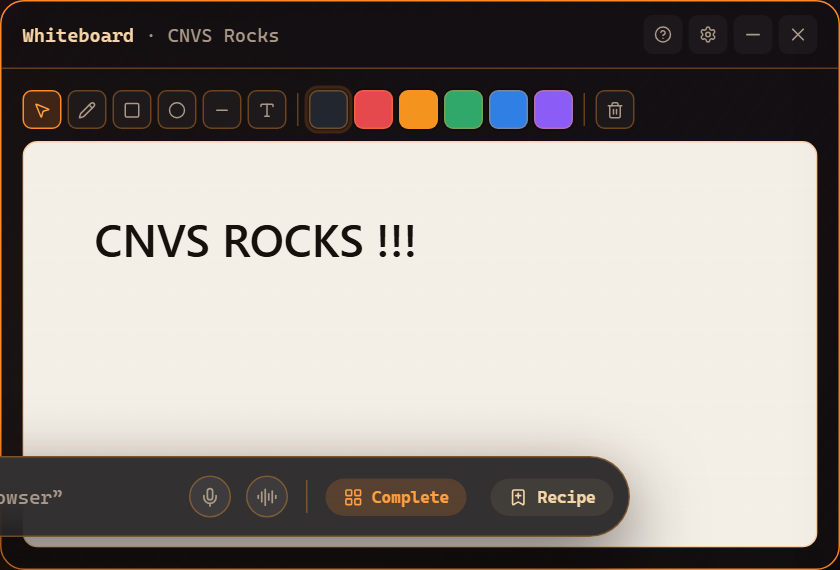
Section titled “4. Draw anywhere”Grab the pen in the left toolbar and draw directly on the canvas - arrows between windows, notes next to an agent. For structured sketches, open a Whiteboard:
5. Never lose a window
Section titled “5. Never lose a window”The Pane Compass (bottom-right) is your minimap: every window as a dot, click to fly to it. The minimized tray (top-left) holds windows you’ve tucked away.
Where to go next
Section titled “Where to go next”- Canvas basics - every gesture and shortcut.
- Arranging windows - layouts, per-mode layouts, recipes.
- Minimap and Pane Compass.
Frequently asked questions
I zoomed/panned and lost my windows - help?
Click the Pane Compass (bottom-right) to jump to any window, or say "tidy windows" to bring everything into a clean grid in view.
Will Mastery HQ rearrange my layout on its own?
Never - automatic layout only runs when you explicitly ask for it ("tidy windows", a layout command, or the Arrange button).